TL;DR: If you use ResizedRandomCrop, then in training time you’ll likely see a zoomed in image. To counter that effect, you need to make your test time image and crops larger, and fine tune the last layers, especially BatchNorm.
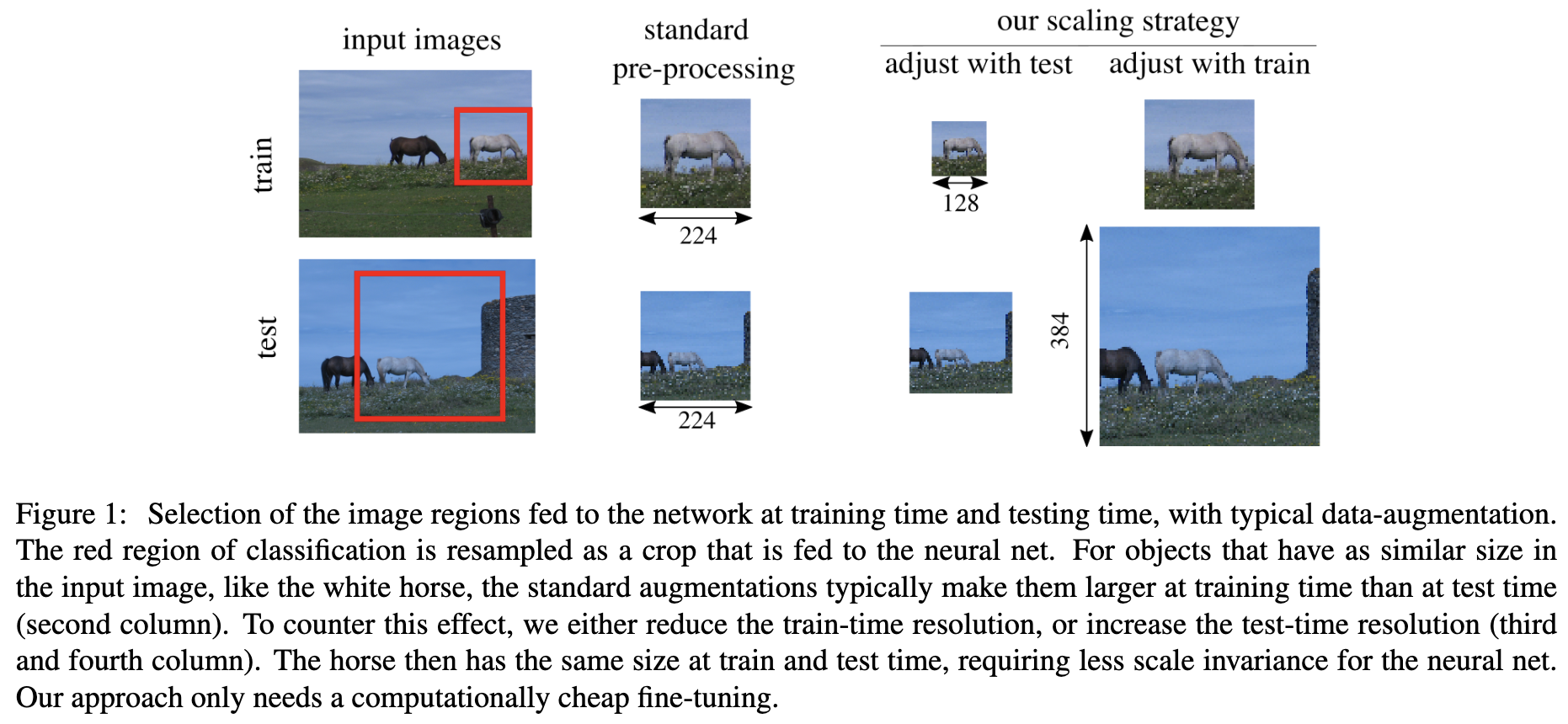
How to read the above image:
- The “standard pre-processing” here means
ResizedRandomCropfor train andCenterCropfor test. - As a result you can see the horse is super small in test.
- Now our goal is to make the horse to have the same pixel size. We can either align with test, or align with train size. The crop size of for test would be larger, but that’s fine as long as the apparent size (pixel size) stays the same.
Now onto the details.
Imagine a classic pinhole camera model. For most of the cameras, their field of view angle stays within a small range. That means the “mm” size would be roughly the same. What’s different is the resolution, or the sampling rate. Our network only care about the pixel size.
At training time:
- : apparent size of training
- : variable relate to focal length.
- : scale parameter for
SizedRandomCrop - : , where is size and the depth. So only related to the object
At test time, usually we isotropically resizing the image so that the shorter dimension is and then extracting a crop (CenterCrop) from that.
Thus, we should increase by too to counter that. That can be intuitively understood as: in training augmentation we zoom in. So test time we should “zoom in” too by sampling more. We also increase to keep the crop / image ratio be the same, so we are not looking at nothing.
Now is different from , and that causes a problem since the pooling layers (note the pool kernel size is fixed) or BatchNorm may not lit it. (Note we assume the network’s last layer is maxpool, not FC, so it can handle images of different sizes). So we’re gonna fine-tune the last layers.